What Do YouTubers Use to Record? 8 Screen Recorders Explained
What do YouTubers use to record videos? Compare eight popular screen recorders for gameplay, tutorials, product demos, and talking-head videos.
YouTubers use different recording software depending on what they make. OBS Studio and Nvidia ShadowPlay suit gameplay and livestreams. ScreenFlow and Camtasia combine desktop recording with detailed editing. Tella is designed for polished tutorials, product demos, and talking-head videos that need recording, editing, and sharing in one place.
The best setup is not necessarily the one your favorite creator uses. Start with the type of video you make, your computer, and how much editing you want to do after recording.
In this article, you'll learn about:
- What YouTubers need to record different types of videos
- Eight popular screen recording tools for YouTube
- The screen recorders used by several well-known YouTubers
- Popular video editing software for YouTube
What do YouTubers use to record videos?
The setup depends on what appears in the video. A screen tutorial needs screen-capture software, while a talking-head video can start with a phone or camera. Most setups also include a microphone and editing software.
| Type of YouTube video | What you need to record it |
|---|---|
| Gameplay or livestream | A game or display capture tool such as OBS Studio, a microphone, and optionally a webcam |
| Tutorial or product demo | A screen recorder that captures the display, microphone, system audio, and optionally a camera |
| Talking-head video | A phone, webcam, or camera plus a microphone; screen capture is only needed when showing software or slides |
| Mixed-format video | Separate camera and screen recordings, then editing software to arrange the clips and audio |
You do not need every item to begin. Choose the source you need to show, make sure your voice is clear, and add editing software when you need to cut mistakes, combine clips, or add captions.
What recording software do YouTubers use?
These eight tools cover the most common YouTube recording workflows:
- Tella for tutorials, product demos, and talking-head videos
- OBS Studio for gameplay recording and livestreaming
- Nvidia ShadowPlay for gameplay on supported Nvidia graphics cards
- ScreenFlow for recording and editing on Mac
- Camtasia for detailed tutorial editing on Mac and Windows
- Loom for quick record-and-share videos
- VEED for browser-based recording and editing
- Bandicam for high-frame-rate Windows capture
For a broader comparison, see our guide to the best screen recording software. Next, let's look at the setups used by several popular creators.
What screen recorder does Ali Abdaal use?
With over 5M subscribers, Ali Abdaal needs no introduction: Ali holds a black belt in productivity and his videos are famous among entrepreneurs and creators.
He's a big Mac user and uses ScreenFlow to record all his videos as explained in this one:
What screen recorder does TommyInnit use?
As a gamer and one of the fastest-growing YouTubers of all time, TommyInnit must have something going for his setup, right?
Aside from being one of the most contagious YouTubers on the planet, his gameplay and screen recording always look 👌
So, what does he use?
According to GearHelper, Tommyinnit uses OBS with a GoXLR mixer for streaming and recording.
OBS is popular with gamers and streamers as it has built-in support for the most popular streaming platforms (like Twitch and YouTube). It’s also both open source and easy to learn the basics.
That said, it takes some playing around with to get it spot on. Several posts on the OBS forum suggest the stream quality is fine in preview mode, yet poor when pushed live.
TommyInnit’s uses the GoXLR mixer to keep his audio clear and crisp. It has an average of 4.5 stars on the Helicon site but does come in at over $400.
What screen recorder does Flamingo use?
In some of Flamingo's videos, you can see the logo for Nvidia ShadowPlay.
Ideal for high-resolution gameplay and recording and replaying, ShadowPlay’s DVR-style Instant Replay feature is a hit with fast-motion gamers and streamers.
If your YouTube channel is likely to feature scenes from Call of Duty, Star Wars, or Street Fighter, Nvidia Shadow Play is recommended.
There are specific system requirements so make sure you have these in place first:
- Operating system: Windows 7, Windows 8, or Windows 10.
- RAM: 2GB system memory.
- Disc space needed: 1 GB.
What screen recorder does Shubham Sharma use?
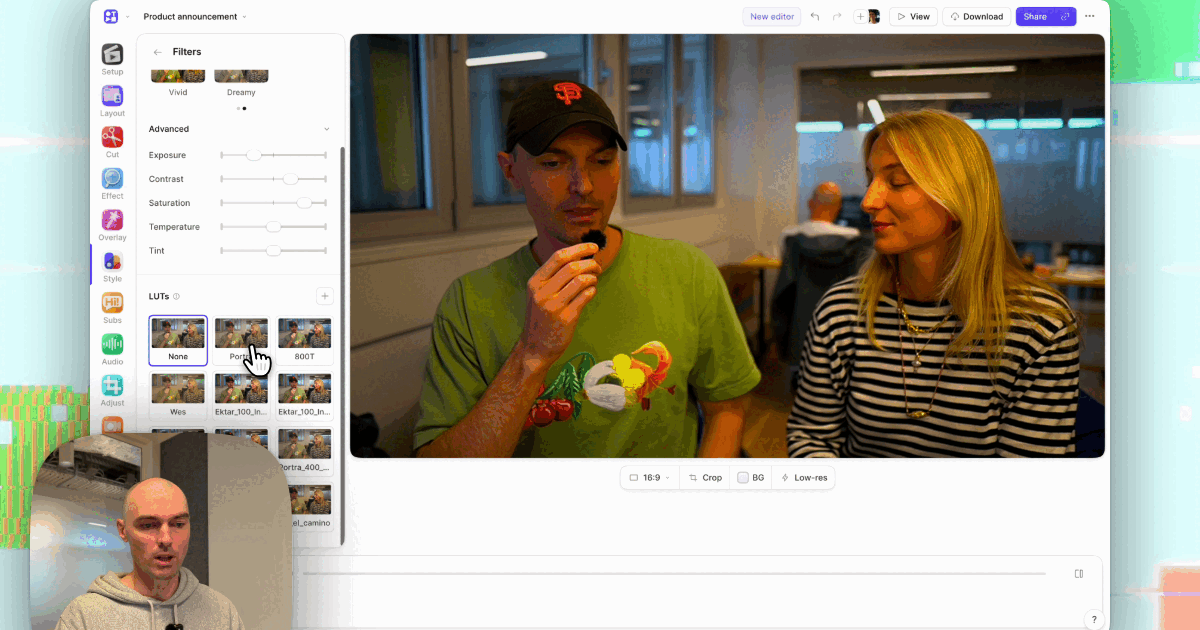
In Shubham’s videos, you can see he’s a big user of Tella with its custom backgrounds, channels in the video library, captions, and clip splitting.
Shubham says he chooses Tella when screen recording for YouTube because of the customization and editing possibilities (like video zooms). He also loves how easy it is to share videos outside of YouTube (one-click sharing or download options).
Another benefit outside of YouTube that Shubham mentions is the ability to embed Tella videos in Notion and emails. Adding a personalized video to projects without coding makes it hassle-free.
Check out this video of Shubham running through how to screen record using Tella:
What is the best screen recorder for YouTube videos?
Like Shubham, we (obviously) vote for Tella. Here are 7 reasons why:
- It’s free to try — every new account starts with a 7-day trial.
- Record long videos — each clip can be up to 6 hours long.
- Edit in the same tool — trim, split, and polish recordings without buying a separate editor.
- Create captions automatically — captions make videos easier to follow without sound.
- Add custom backgrounds — keep your recording on-brand without rebuilding the scene in another editor.
- Combine video clips — reuse an intro, outro, or clip from an earlier recording.
- Share or download — publish with a link or export an MP4 for YouTube.
What editing software do YouTubers use?
Most YouTubers use a video editing software alongside their recording app.
Unlike screen recorders, there aren't that many of them. The most popular ones are:
Here's a great vid comparing some of them:
PS: If you use Tella, you don't necessarily need an editing software.