Best Screen Recorders in 2026: 10 Free & Paid Tools Compared
The best screen recorders in 2026, compared: Tella, OBS, Loom, Screen Studio, and 6 more. We compared pricing, platforms, recording limits, editing, and hosting.
Every screen recorder can capture your screen. The differences show up in everything around that: whether there's a real editor, whether your recording is instantly shareable or stuck as a file on your desktop, what the free plan actually lets you do, and how much polish you get without extra work.
We compared ten of the most popular screen recorders on the things that actually matter — price, platforms, recording limits, built-in editing, and hosting — so you can pick the right one for your work.
Last updated: October 2026
Quick picks
- Best all-in-one (record + edit + share): Tella
- Best for screen + facecam: Tella
- Best free & unlimited local recording: OBS Studio
- Best for polished Mac demos: Screen Studio
- Best for Chromebooks & the browser: Screencastify
- Best budget all-rounder: ScreenPal
At a glance
| Tool | Best For | Starting Price | Free Plan | Platforms |
|---|---|---|---|---|
| Tella | All-in-one recorder + editor | $13/mo | 7-day trial | Mac, Windows, Web |
| OBS Studio | Free unlimited recording | Free | Yes (open source) | Mac, Windows, Linux |
| Loom | Quick work messages | $18/user/mo | Yes (5 min limit) | Mac, Windows, Web |
| Screen Studio | Polished Mac demos | $9/mo | No | Mac only |
| ScreenRec | Instant-share capture | $8.32/mo | Yes (unlimited) | Mac, Windows |
| Screencastify | Chrome-first recording | See pricing | Yes (30 min limit) | Web (Chrome) |
| Cap | Open-source alternative | $29/yr | Yes (5 min cloud) | Mac, Windows |
| Camtasia | Deep desktop editing | $179.88/yr | No | Mac, Windows |
| Bandicam | High-FPS capture | $33.26/yr | Yes (10 min limit) | Mac, Windows |
| ScreenPal | Budget all-rounder | $4/mo | Yes (15 min limit) | Mac, Windows, Web |
A quick note on how we compared: the factual details below (pricing, platform support, recording limits) come from the same sourced dataset we maintain for our one-to-one comparison pages, based on each vendor's published plans and docs. The "best for" verdicts are our editorial take. Tella is our product, and we've tried to keep its entry honest — it's the strongest choice when you want to record, edit, and share in one place, and there are better options for things like game capture or heavy manual editing.
How we compared these screen recorders
We maintain a feature matrix for these tools and checked it against the vendors' published plans, product pages, and help documentation in October 2026. Each tool's linked Tella comparison includes the underlying vendor sources.
We used the same criteria for every recorder:
- Capture: supported platforms, screen, camera, microphone and system audio, recording limit, and maximum published resolution
- Editing: whether an editor is included, how deep it goes, and whether automation can shorten the work after recording
- Sharing: local export, hosted links, storage, collaboration, and analytics
- Cost: the lowest publicly listed individual plan, plus the practical limits of any free plan or trial
- Best fit: the use case where the tool's capture, editing, and sharing workflow has the clearest advantage
This is a feature-and-workflow comparison, not a hardware performance benchmark. We don't rank crash rates, CPU/GPU load, or frame drops because those claims require repeatable tests on standardized hardware. When a vendor doesn't publish a limit, we say so instead of estimating it. Tella makes this page and is one of the products compared; the recommendations below still name another tool whenever it is the stronger fit.
The 10 best screen recorders compared
| Tool | Best for | Free plan | Paid from | Platforms | Recording limit | Built-in editor | Hosting |
|---|---|---|---|---|---|---|---|
| Tella | All-in-one recorder + editor | 7-day free trial | $13/mo (Pro) | Mac, Windows, Web | Up to 6 hours per clip (paid); 2 hours (trial) | Yes — AI editor | Yes + analytics |
| OBS Studio | Free & unlimited local recording | Free & open source | Free | Mac, Windows, Linux | Unlimited | No | No |
| Loom | Quick work messages | Yes | $18/user/mo | Mac, Windows, Web | 5 min (Free) / unlimited (paid) | Light | Yes |
| ScreenRec | Free instant-share capture | Yes | $8.32/mo | Mac, Windows | Unlimited | No | Yes |
| Screencastify | Chrome-first recording | Yes | See pricing | Web (Chrome) | 30 min (Free) / 180 min (Pro) | Paid only | Yes |
| Screen Studio | Polished Mac demos | No | $9/mo | Mac | Unlimited (local) | Yes | Links up to 30 min |
| Cap | Open-source Loom alternative | Yes | $29/yr (Desktop) | Mac, Windows | Free cloud links: 5 min; paid Desktop: unlimited local recording | Yes | Yes |
| Camtasia | Deep desktop editing | No | $179.88/yr | Mac, Windows | Unlimited | Yes — full timeline | No |
| Bandicam | High-FPS Windows capture | Yes | $33.26/yr | Mac, Windows | 10 min (free) / unlimited (paid) | No | No |
| ScreenPal | Budget all-rounder | Yes | $4/mo | Mac, Windows, Web | 15 min (free) / unlimited (paid) | Yes | Yes |
Prices and linked limits lead directly to each vendor's plans or documentation, where you can check billing terms and current offers. Tool names lead to the full Tella comparisons for feature-by-feature detail.
Tella — best all-in-one recorder + editor
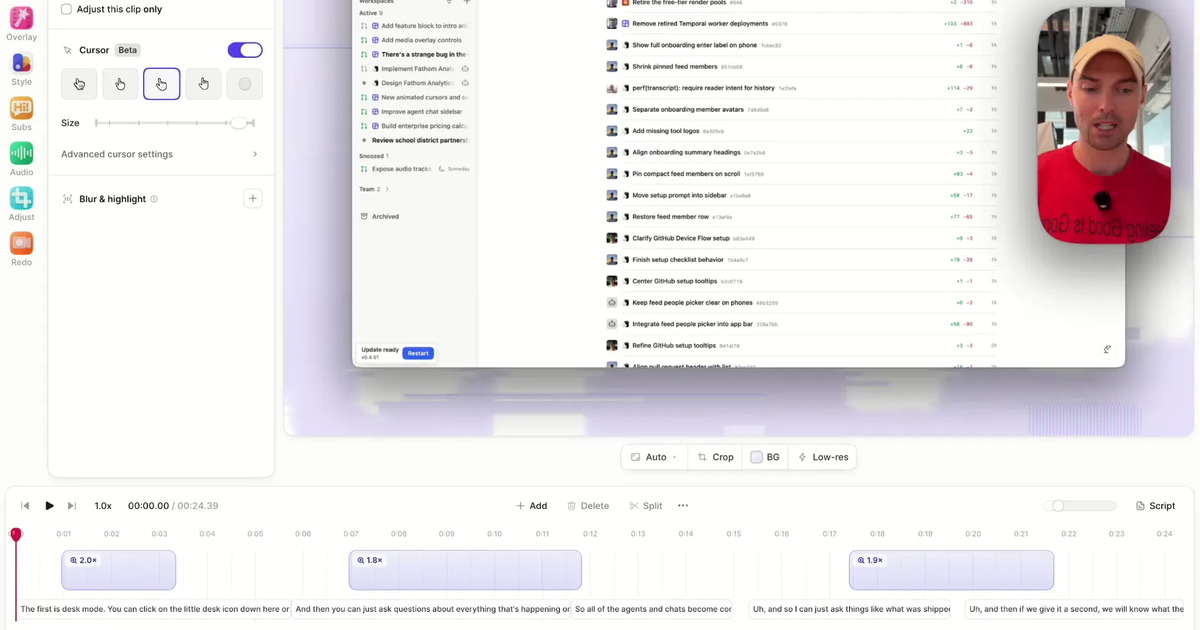
Tella records your screen, camera, mic, and system audio on Mac, Windows, and the web, then cleans the recording up with AI editing — auto-cut, auto-zoom, auto-layouts, silence and filler-word removal — and hosts the result on a shareable, branded page with viewer analytics. All in one place, with recordings up to 4K and clips up to 6 hours, transcription in 106 languages, and Loom folder import if you're migrating an existing library. Teams at JCDecaux, Pleo, and Hubstaff use it for demos, onboarding, and async updates.
Best for: polished demos, tutorials, courses, and async video without needing a separate editor or video host.
Keep in mind: Tella is built for talking-head demos, walkthroughs, and course content rather than long-form game capture or frame-by-frame VFX work.
Try Tella for free, or see how it compares to the other tools on this list.
OBS Studio — best free & unlimited local recorder
OBS is a free, open-source powerhouse for unlimited local screen recording and live streaming, with scene composition and capture up to 4K/60. It also runs on Linux.
Best for: free, unlimited local recording and live streaming.
Keep in mind: there's no built-in editor, hosting, or sharing, and the scene-based interface has a real learning curve.
Loom — best for quick work messages
Loom nails the quick async video message: hit record, get a shareable link, and drop it into a doc or ticket. It's a natural fit if your team already lives in Atlassian tools.
Best for: fast record-and-send updates inside an Atlassian stack.
Keep in mind: editing stays light, the fuller AI features sit behind paid tiers, and seats add up at $18/user/mo. For more options, see our full list of Loom alternatives.
ScreenRec — best free instant-share capture
ScreenRec is a lightweight free recorder that uploads and gives you a private share link the moment you stop recording, with 2 GB of free cloud storage.
Best for: no-frills capture with instant private sharing links.
Keep in mind: editing, branding, and 4K are paid-only, and there's no timeline editor.
Screencastify — best Chrome-first recorder
Screencastify lives in the Chrome browser, which makes it a natural fit for education and Chromebook users — nothing to install beyond the extension.
Best for: browser-based recording for classrooms and Chromebooks.
Keep in mind: there's no native Mac or Windows app, and the free plan caps recordings at 30 minutes.
Screen Studio — best for polished Mac demos
Screen Studio produces gorgeous macOS recordings with smooth automatic zoom and motion, exported up to 4K/60.
Best for: beautiful macOS product demos with automatic zoom.
Keep in mind: it's macOS-only, shareable links are capped at 30 minutes each, and there's no free plan, team plan, or full hosting.
Cap — best open-source Loom alternative
Cap is an open-source recorder for Mac and Windows with a built-in editor and instant sharing links.
Best for: an open-source, cross-platform record-and-share tool.
Keep in mind: it's a younger product with a smaller ecosystem than the incumbents.
Camtasia — best desktop editing suite
Camtasia pairs screen recording with a deep timeline editor, effects, and annotations for polished training videos.
Best for: detailed tutorials that need a full desktop editor.
Keep in mind: it's a heavier desktop app licensed from $179.88/yr, with no free plan and no built-in hosting.
Bandicam — best high-FPS Windows capture
Bandicam is a long-standing capture tool built for high frame-rate game and screen recording, recording up to 4K on Windows and 5K on Mac.
Best for: high-FPS game and screen capture on Windows.
Keep in mind: the free plan caps clips at 10 minutes, and there's no built-in editor or hosting.
ScreenPal — best budget all-rounder
ScreenPal (formerly Screencast-O-Matic) is an affordable all-rounder that records, lightly edits, and hosts video from $4/mo.
Best for: affordable recording with light editing and hosting.
Keep in mind: the free plan caps recordings at 15 minutes and 4K export is paid-only.
How to choose screen recording software
Start from what happens after you hit stop:
- You want a finished, shareable video with minimal work. Pick an all-in-one tool with real editing and hosting — this is where Tella is strongest, and ScreenPal is the budget option.
- You just need free, unlimited local capture. OBS Studio, no contest. Be ready to bring your own editor and video host.
- You send quick internal updates all day. Loom or Cap — record, get a link, paste it.
- You need to capture a Zoom meeting. Use Zoom's built-in recorder when it's available; otherwise compare the desktop and mobile options in our guide to recording a Zoom meeting.
- You're on a Chromebook or can't install apps. Screencastify, or Tella's web recorder — it records your Chromebook screen with audio right from the browser; see also our Chrome screen recorder page.
- You make cinematic Mac-only product demos. Screen Studio, or Tella if you also want hosting, analytics, and Windows/web support.
- You record games or need maximum frame rates. Bandicam on Windows.
Recording on a specific device? We keep step-by-step guides for Mac, Windows, and Chrome, plus dozens of ways teams use a screen recorder.
The best free screen recorders
"Best screen recorder" usually means "the best one I can use without paying," and that's where the list narrows fast. The thing that decides it for most people isn't features — it's how long a single free recording is allowed to run.
| Tool | Free recording or sharing limit |
|---|---|
| OBS Studio | Unlimited — free & open source |
| Cap | 5 minutes per cloud share link; personal use only |
| ScreenRec | Unlimited, with 2 GB of free storage |
| Screencastify | 30 minutes |
| ScreenPal | 15 minutes |
| Bandicam | 10 minutes |
| Loom | 5 minutes |
Same sourced dataset as the table above, filtered to the seven tools that have a free plan. Screen Studio, Camtasia, and Tella have no free plan at all.
How to read that list:
- If you want genuinely unlimited free recording, OBS Studio is the safest answer — open source, no account, nothing capped. The trade is that you finish with a raw file and no editor or share link.
- If you want free recording and a link to send, ScreenRec is the closest unlimited fit. ScreenPal also records, edits, and hosts for free if its 15-minute limit is enough.
- If a 5-30 minute recording cap is fine, Screencastify, ScreenPal, Bandicam, and Loom all work free, with different output, storage, watermark, and usage restrictions. Cap's free cloud share links are capped at 5 minutes; check its mode-specific terms before choosing it for longer recordings.
- Free plans change often. These limits reflect each vendor's published plans at the time of writing — follow a tool's name to its comparison page for the current detail.
Tella doesn't have a free plan; every new account starts with a 7-day free trial instead. So if "free forever" is a hard requirement, start with OBS or ScreenRec. If what you're really trying to do is stop paying for three tools — recorder, editor, and video host — that's a different comparison, and it's the one the table at the top of this page is built for.
The best AI screen recorders
"AI screen recorder" can describe three different jobs after capture: editing the picture, cleaning the sound, or turning the recording into text such as a transcript, captions, summary, or chapters. Decide which output you need before comparing AI feature lists.
Tella is our pick for AI-assisted screen recording and editing. Its AI works on the finished video: Auto Cut removes mistakes, silences, and filler words; Auto Zoom focuses attention on the action; Auto Layouts reframes screen and camera footage; and Studio Voice improves spoken audio. You can review and adjust the result in the editor before sharing or exporting it.
That does not make Tella the answer for every kind of recording. OBS Studio is still better for free local capture, live streaming, and games. Camtasia is better when you want a deep manual timeline. Tella is the strongest fit when the goal is to turn a screen-and-facecam recording into a polished, shareable video with less editing work.
The best screen recorders with facecam
If you want to record your screen and face together, the best choice depends on how much setup and editing you want after the recording:
- Tella is the best all-in-one facecam recorder. It captures your screen, camera, microphone, and system audio together, then lets you reposition your face, switch layouts, edit, and export in up to 4K. See the step-by-step guide to recording your face and screen together.
- OBS Studio is the best free facecam recorder. Its scenes give you detailed control over screen and camera sources, but you need a separate editor and somewhere to host the finished video.
- Loom is best for quick facecam work messages. It records screen and camera and produces a shareable link quickly, with lighter editing than Tella.
For tutorials, product demos, and YouTube videos, Tella is the simplest route from screen-and-face capture to a polished video. OBS is the stronger choice when live streaming or granular capture control matters more than editing and sharing.
FAQ
What is the best screen recording software in 2026?
It depends on the job. For an all-in-one tool that records, edits with AI, and hosts on a shareable page, Tella is our pick. For free, unlimited local recording and streaming, OBS Studio is the standard. For polished macOS demos, Screen Studio is excellent, and for quick async work messages, Loom is popular.
What is the best screen recorder for teams?
For teams sharing customer-facing video — demos, onboarding, async updates — Tella is our pick: shared workspaces, branded video pages, viewer analytics, and Loom folder import for existing libraries. Teams at JCDecaux, Pleo, and Hubstaff use it this way. For internal-only quick messages, Loom remains a solid default, and ScreenPal is the budget team option.
What is the best free screen recorder?
OBS Studio is the best fully free option for unlimited local recording, though it has no editor or hosting. ScreenRec, ScreenPal, and Screencastify all offer free plans with built-in sharing; note that several free plans add recording-length limits (for example 30 minutes on Screencastify and 15 minutes on ScreenPal). Tella doesn't have a free plan, but every new account starts with a 7-day free trial.
Which screen recorders have a free plan with no recording time limit?
Of the tools we compared, OBS Studio records locally with no time limit and is free and open source, while ScreenRec doesn't cap clip length after you create a free account (its free cloud storage is 2 GB). The time-limited free recordings are Screencastify at 30 minutes, ScreenPal at 15 minutes, Bandicam at 10 minutes, and Loom at 5 minutes. Cap limits free cloud share links to 5 minutes. Check Cap's current terms for free local recording. Screen Studio, Camtasia, and Tella have no free plan at all — Tella starts every new account with a 7-day free trial instead.
What is the best screen recorder with no time limit?
OBS Studio is the best screen recorder with no time limit if you want a completely free tool: it records locally without a length cap. ScreenRec also offers unlimited-length recording after free registration. Cap limits free cloud share links to 5 minutes, while its paid desktop license supports unlimited local recording. Paid plans from Tella, Loom, Screen Studio, Camtasia, Bandicam, and ScreenPal support unlimited or long-form recording with different editing and hosting options.
What is the best free screen recorder without a watermark?
OBS Studio is the best completely free screen recorder without a watermark or recording limit. ScreenRec is another no-watermark option with unlimited recording after free registration and 2 GB of cloud storage. ScreenPal also has no watermark on its free recordings, but each recording is limited to 15 minutes. Bandicam's free version and the free Camtasia Editor add watermarks.
Which screen recorder works on both Mac and Windows?
Tella, OBS, Loom, ScreenRec, Cap, Camtasia, Bandicam, and ScreenPal all run on both Mac and Windows. Screen Studio is macOS-only, and Screencastify runs as a Chrome extension rather than a native desktop app.
What is the best screen recorder with built-in editing?
Tella, Camtasia, Screen Studio, Cap, and ScreenPal all include editing. Tella and Screen Studio lean on automatic editing (AI cuts, auto-zoom, auto-layouts) so you can go from raw recording to finished video quickly, while Camtasia offers the deepest manual timeline.
What is the best screen recorder with facecam?
Tella is our pick for screen and facecam recording because it captures your screen, camera, microphone, and system audio together, then lets you change the camera layout after recording and export in up to 4K. OBS Studio is the best free alternative if you want detailed scene controls and do not mind setting up editing and hosting separately.
What is the best AI screen recorder?
Tella is our pick for AI-assisted screen recording because its AI changes the finished video, not just the transcript: Auto Cut removes mistakes, silences, and filler words; Auto Zoom follows the action; Auto Layouts reframes screen and camera footage; and Studio Voice cleans up spoken audio. OBS is still the better choice for free local or game capture, while Camtasia offers deeper manual timeline editing.
What is the highest quality screen recording?
Among the tools compared here, Tella records and exports in up to 4K, while OBS Studio and Screen Studio support capture up to 4K at 60 frames per second. Resolution is only part of quality: a sharp source, readable scaling, clear audio, and the right frame rate matter too.
What do most YouTubers use to record their screen?
There is no single recorder used by most YouTubers. OBS Studio is a common choice because it is free and gives creators detailed capture and streaming controls. Tella is a better fit when a creator wants to record screen and facecam, edit quickly, and share or export from one workflow. For a deeper breakdown, see what screen recorders YouTubers use.
Do I need to download screen recording software?
Not always. Tella records in the browser as well as via native Mac and Windows apps, and Screencastify runs in Chrome. Others such as OBS, Screen Studio, Camtasia, and Bandicam require a desktop download.