Camera and screen, graded apart
Tella records your camera and screen as separate tracks, so the Filters section has Camera, Screen, and Media tabs. Warm up your face without turning your product's brand blue into teal.
Grade your camera, screen recording, and media separately with presets, color sliders, and .cube LUTs, right in the editor where you share. Works on Mac, Windows, and in the browser.
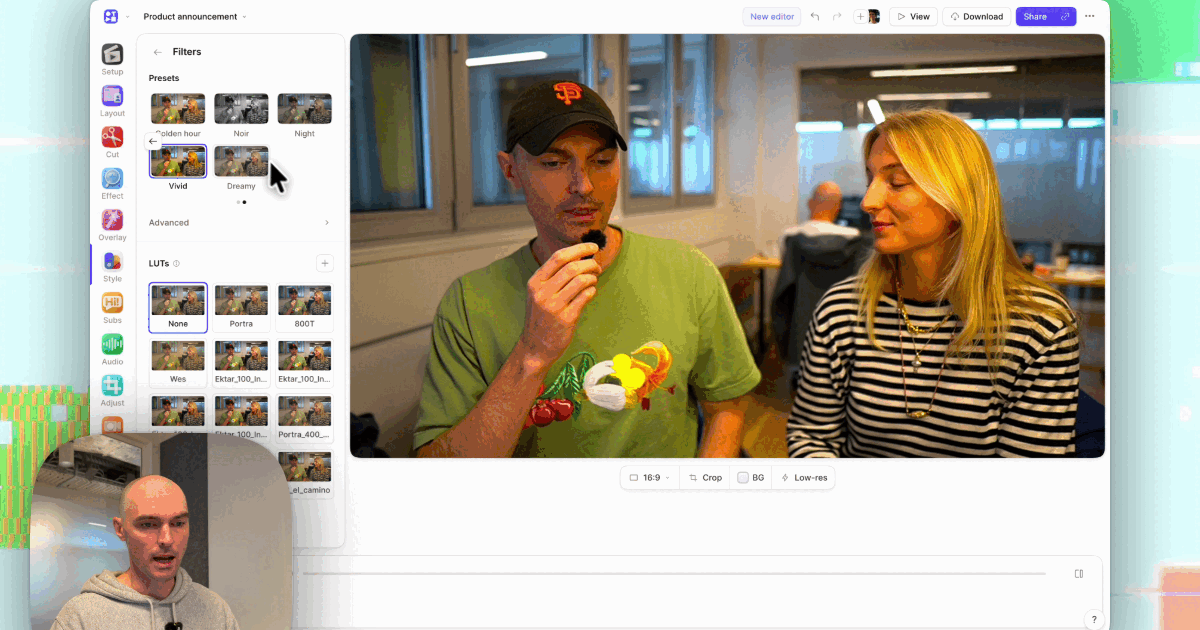
Tella records your camera and screen as separate tracks, so the Filters section has Camera, Screen, and Media tabs. Warm up your face without turning your product's brand blue into teal.
Pick Warm, Cool, Crisp, Fade, or Mono, or a camera look like Golden hour, Vivid, or Noir. Fine-tune Exposure, Contrast, Saturation, Temperature, and Tint, or apply a .cube LUT with an intensity control.
Upload a 3D .cube LUT and it stays in your library. Share it to your workspace and every teammate gets the same brand look in their LUT grid.
Record your screen and camera with Tella's Mac app, Windows app, Chrome extension, or web recorder, or upload a video. The camera and screen stay separate tracks.
In the editor, press B for Style and choose Camera, Screen, or Media under Filters. Click a preset, or click Customize to adjust the sliders or pick a LUT: a built-in film look (Portra, 800T, or Wes) or your own .cube file.
The filter applies to every matching clip, so the whole video looks consistent. Turn on Apply to this clip for an outlier. The share link and embeds update as you edit, and MP4 exports in up to 4K include the grade.
The facts people ask about most, in one place.
B), with separate Camera, Screen, and Media tabs..cube files up to LUT_3D_SIZE 65 (17, 33, and 65-point cubes work), with LUT intensity. 1D LUTs aren't supported. Built-in LUTs: Portra, 800T, and Wes.set_clip_filters and PATCH /v1/videos/{videoId}/clips/{clipId}/filters.Tella is a screen recorder for Mac, Windows, Chrome, and the web with color filters and .cube LUTs built into its editor. Because it records the camera and screen as separate tracks, you can grade your webcam without changing the colors of your product UI, and the hosted share link updates with the new grade.
Yes. Tella applies 3D .cube LUTs up to size 65 to camera recordings, screen recordings, and uploaded media, with a LUT intensity control. It includes three built-in LUTs (Portra, 800T, and Wes), and uploaded LUTs can be shared with your workspace.
Yes. Choose the Camera tab under Filters and apply a preset or LUT there, and leave the Screen tab set to None. The two are graded separately.
No. Filters play in the editor, on the hosted share link, and in embeds as soon as you apply them. Export an MP4 only when you need a file; it includes the same grade.
Yes, if it's a 3D .cube file. Export the LUT from Resolve or Premiere as a 17, 33, or 65-point cube, then click Upload LUT as a .cube file in Tella's Filters panel. Most LUTs are made for log footage, so lower LUT intensity on a normal webcam.
Yes. Tella's MCP server has get_clip_filters and set_clip_filters, so Claude, ChatGPT, or any MCP client can apply presets, sliders, and LUTs to each clip's camera and screen, then check the result with a rendered frame.
Crisp on the screen recording and Warm on the camera suits most product demos. Crisp adds contrast without shifting your UI's hues, and Warm corrects the cool, blue cast most webcams have under office lights.